

【Buyer Beware】The Blind Trap of the MacBong! Mini Keypad: Identifying the Compatible Chipset (Teardown Review)
Hello fellow vintage Mac enthusiasts, Kay Koba here...
One of the best quality-of-life features of MacBong! is its support for a mini wireless keypad. When your test bench is cluttered with logic boards, multi-meters, and soldering irons, you don't want a massive keyboard taking up space. Having a tiny keypad right next to your project to test and boot systems is an absolute game-changer.
However, there is a massive catch if you are looking to source one of these keypads yourself on Amazon, eBay, or AliExpress.
You will find hundreds of listings featuring the exact same shell. But as the saying goes: never judge a microcontroller by its cover.
100% Identical on the Outside, But a 50/50 Gamble
Take a close look at the first image (image.png).
Left Side: Completely Incompatible with MacBong! (Does not enumerate)
Right Side: 100% Compatible (Works flawlessly)
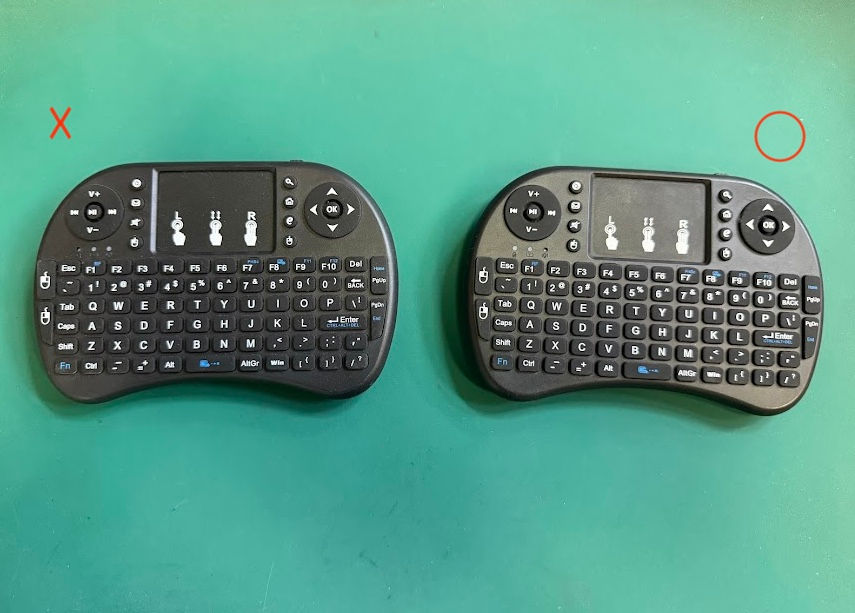
From the plastic molding, button layout, and rubber texture right down to the silk-screened media icons—they are structurally identical. They likely came from the exact same factory housing. Looking at the exterior, it is physically impossible to know whether you bought a functional unit or a paperweight.
The Moment of Truth: A Tale of Two PCBs
The real difference only reveals itself once you back out the screws and pop off the rear cover. Let’s look at the internal circuit boards in pic bellow:
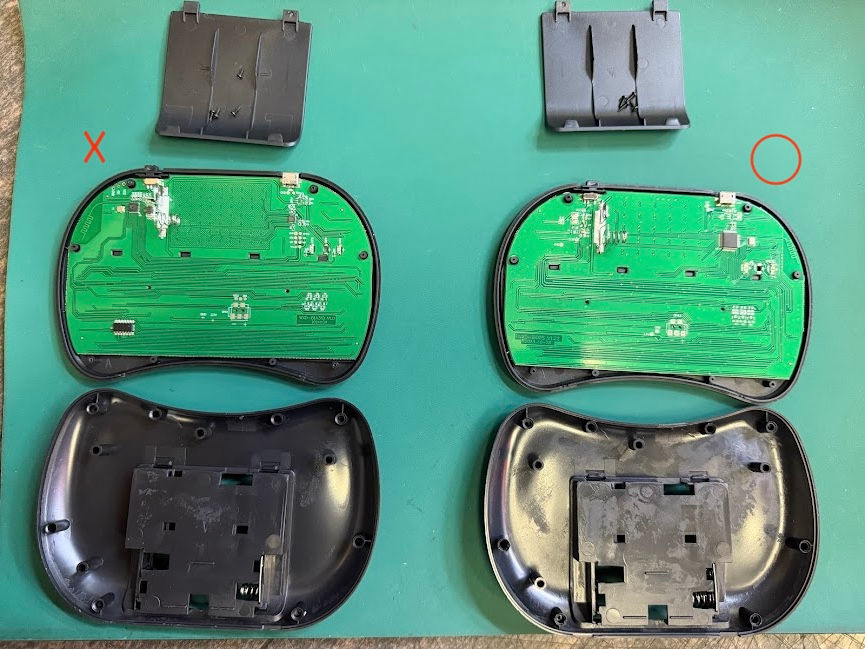
❌ The Incompatible Unit (Left): The "Three-Chip" Architecture
If you examine the PCB on the left, you will notice that the processing power is divided across three distinct integrated circuits (ICs) scattered on the board. The USB controller embedded in this specific configuration uses a library protocol that refuses to communicate with MacBong!’s ATmega328P and USB Host Shield system. If you plug the dongle into MacBong!, it will simply fail to recognize it.
⭕ The Compatible Unit (Right): The Clean "Single-Chip" Solution
Now look at the working board on the right. The design is much cleaner, featuring a single, centralized main IC chip sitting on the right-middle side of the PCB. This specific unified chip pairs instantly with the MacBong! firmware library, bridging your inputs flawlessly to your vintage Mac (where the Windows key is automatically mapped to the essential Command ⌘ key).
Final Verdict: Save Yourself the Gacha
In the world of generic budget electronics, manufacturers constantly alter internal components and swap PCBs across batches depending on what chips are cheapest that week. Based on our testing, buying these randomly online gives you about a 50% chance of getting the correct version.
If you love the thrill of the gamble and don't mind opening up shells to audit your hardware, feel free to hunt for one! But if you want a guaranteed plug-and-play solution straight out of the box, we highly recommend selecting the pre-tested Verified Wireless Mini Keypad option ($12 USD) when purchasing your MacBong!. We hand-verify the internal chipset of every optional unit we ship so you don't have to break out the screwdriver.
A quick side note: Even the compatible single-chip version has a known, unfixable firmware quirk inherent to its factory design where it can occasionally trigger brief phantom mouse clicks. It isn't fatal to testing or bench operation, but please consider it a bit of "retro-adjacent charm" and note that it is excluded from warranty claims!
Happy repairing, and may your chimes always bong!


Comments